Identity, SSO & RBAC
Admin guide
Greenlight authenticates every user through your identity provider. Sign-in uses OpenID Connect with Entra ID, Okta, Google Workspace, or any other spec-compliant OpenID Connect provider (Authentik, Keycloak, Auth0, PingFederate, and more) configured by issuer URL; SAML 2.0 and SCIM provisioning are coming soon. With Entra ID, Okta, and a generic provider that emits a groups claim, Greenlight roles can be mapped from customer-managed group membership; Google Workspace roles are managed directly in the Greenlight dashboard (Google ID tokens carry no group claim).
Greenlight does not store a password, a recovery secret, or a second-factor configuration for any user. The IdP is the only authority on whether a session can begin — MFA, conditional access, and step-up flows are the IdP’s responsibility and apply without any Greenlight-specific configuration. If a user is disabled in the IdP, access ends when their Greenlight session expires or is revoked; SCIM-based immediate deprovisioning arrives with SCIM support.
Protocol support
Section titled “Protocol support”| Protocol | Notes |
|---|---|
| OpenID Connect | Supported today for Entra ID, Okta, Google Workspace, and any other provider that publishes an OIDC discovery document. |
| SAML 2.0 | Coming soon for IdPs or enterprise standards that require SAML. |
| SCIM 2.0 | Coming soon for automatic user and group provisioning. |
Wire it up
Section titled “Wire it up”- In Entra ID, create an Enterprise application for Greenlight. Pick “Integrate any other application you don’t find in the gallery.”
- Configure OIDC by registering Greenlight as a confidential client. Add the Greenlight redirect URL the install wizard provides.
- In Token configuration, add a groups claim of type Groups assigned to the application, then assign the groups you’ll map to the app under its Users and groups, so they ride in the sign-in token. Security groups leaves out Microsoft 365 groups and drops the whole claim for users in more than 200 groups; the Entra setup guide has the details. Greenlight reads roles from that claim alone — it holds no standing directory permission. (It can optionally read group names for display; see Showing group names instead of IDs.)
- Verify the group claims Greenlight receives before mapping groups to roles.
Full walkthrough: Microsoft Entra ID setup.
- In Okta, create an OIDC Web Application.
- Set the sign-in redirect URI from Greenlight’s install wizard.
- Add the groups claim to the ID token.
- Assign the groups that should have Greenlight access.
- Verify the group claims Greenlight receives before mapping groups to roles.
Full walkthrough: Okta setup.
- Configure Greenlight as an OIDC client in Google Cloud for the Workspace domain.
- Add the redirect URI from Greenlight’s install wizard.
- Optionally list your Workspace domains to restrict sign-in to them. A Workspace with several domains needs all of them listed; leave the field blank to rely on the OAuth client’s Internal user type instead, which Google already scopes to your whole Workspace organization.
Google ID tokens carry no groups claim, so Greenlight does not map Google groups to roles. For Google Workspace orgs, roles are managed in the dashboard — assign Builder, Admin, and Org Owner on the Users page after a person signs in. Everyone who signs in starts as a Builder; the Workspace domain list is Greenlight’s only sign-in gate for Google.
Full walkthrough: Google Workspace setup.
- In your provider, create a confidential OAuth 2.0 / OpenID Connect client for Greenlight and register the redirect URI from the install wizard.
- Copy the provider’s issuer URL — it must serve
/.well-known/openid-configurationover HTTPS. - In the wizard, choose Other OpenID Connect provider, paste the issuer, client ID, and secret, and pick the label users see on the sign-in button.
- Keep roles Greenlight-managed unless your provider emits a groups claim in the ID token; if it does, you may map that claim’s values to roles instead.
Full walkthrough: Other OpenID Connect provider setup, with Authentik as the worked example.
The three roles
Section titled “The three roles”Greenlight has three roles, strictly nested — each includes everything the one below it can do, so a user mapped into several groups holds the strongest mapped role. Anyone who signs in through your IdP gets the Builder role automatically; the elevated roles come from group mappings, re-evaluated at every sign-in.
| Role | What they can do | Maps to typical IdP group |
|---|---|---|
Builder (user) |
The default role for everyone with Greenlight access. Builders create apps; the user who creates an app automatically owns it and can give other people access as editors or viewers. Owners manage their app’s environment variables, request integrations, edit app-scope Knowledge, and ask to pause or resume their own app. | None needed by default — everyone who signs in gets this role. Optionally map group(s) here to limit who can use Greenlight at all. |
Admin (admin) |
Manage integrations and credentials, tune the deploy checks, edit org-scope Knowledge, review agent proposals, view the audit log, and kill or restore any app. The day-to-day IT role. | The IT operations team. |
Org Owner (org_admin) |
Everything an Admin can do, plus: install or upgrade Greenlight, change IdP group mappings, and add or remove other Admins and Org Owners. | The small group (often 1–3 people) who installed Greenlight. |
Roles are evaluated on every API call and MCP tool invocation. App access at the edge goes through /auth/check, whose decision is cached briefly — about 60 seconds — so removing someone’s access or changing their role takes effect within that window. When immediate revocation is needed, a force-re-auth invalidates the cached decision at once. The check never asks for anything beyond the Greenlight sign-in: connecting a person’s own account to a system an app acts as them in happens from a Connect button inside the app, on a page Greenlight shows before the system’s sign-in (user passthrough).
Deployed apps sit behind the same SSO. Each app is in one of two states, set on its own Access area: open to everyone in your organization, or restricted to the people and groups its owner has named. Each person named holds one of two roles: Viewer, who can use the app, or Editor, who can also manage it (the API and CLI call an editor a co-owner). The app’s owner and its editors, and Admins and Org Owners, always retain access — that guarantee is enforced in code, not configuration.
A restricted app can also admit groups, each bound as a viewer or an editor: a Greenlight group you create under Users & RBAC, or a directory group an Org Owner has registered there by its identifier. The owner picks either from the same search box they use to name a person — by the group’s name, never its identifier, which they never type or see — and can expand a bound group to see who it admits before deciding. For a directory group that list is the members who have signed in to Greenlight, labelled as such rather than presented as your directory’s full answer. Binding a group as editor asks the owner to confirm first, since it hands everyone in the group the right to delete the app; the confirm names the member count, and for a directory group says that the figure covers the members who have signed in. The two ways of naming people only ever add up — someone reaches a restricted app if they are named on it or belong to a group bound to it, so binding a group never takes access away from anyone already named. A group bound as editor hands every one of its members what an individual editor holds, including deleting the app, so the app lists them as editors with the group beside their name and only unbinding the group — or taking them out of it — ends that. Membership is read when the request arrives rather than at sign-in, so adding or removing someone from a group takes effect within the same ~60-second window, not at their next login. Binding a group to an app that is open to everyone does not restrict it; only the Access setting does that.
Log in as (impersonation)
Section titled “Log in as (impersonation)”An Org Owner can log in as an Admin or Builder from Users & RBAC to see the dashboard exactly as that colleague does — the same navigation, app scoping, and permissions — without creating a test account. Pick a user, confirm, and you’re viewing under their role; a banner stays on screen naming who you’re viewing as, and Stop impersonating returns you to your own session in one click.
Two things to know: you can only impersonate active Admins and Builders (never another Org Owner), and every action you take while impersonating is recorded in the audit log under your own identity, tagged with who you were viewing as. It’s a read-and-verify tool for RBAC, fully accountable — not a way to act anonymously.
App ownership
Section titled “App ownership”App ownership is not a role and isn’t mapped from the IdP. When a user creates an app, they automatically become its owner. Ownership gives them:
- Edit access to the app’s environment variables.
- The ability to request new integrations for the app.
- Edit access to the app’s app-scope Knowledge.
- The ability to ask for the app to be paused or restored (killing it is an Admin action).
- The ability to give other people access from the app’s Access tab — as editors, who can manage the app alongside them, or viewers, who can only use it.
Ownership is per-app. A Builder who owns three apps can manage those three apps but cannot do anything an Admin can do.
Group-to-role mapping
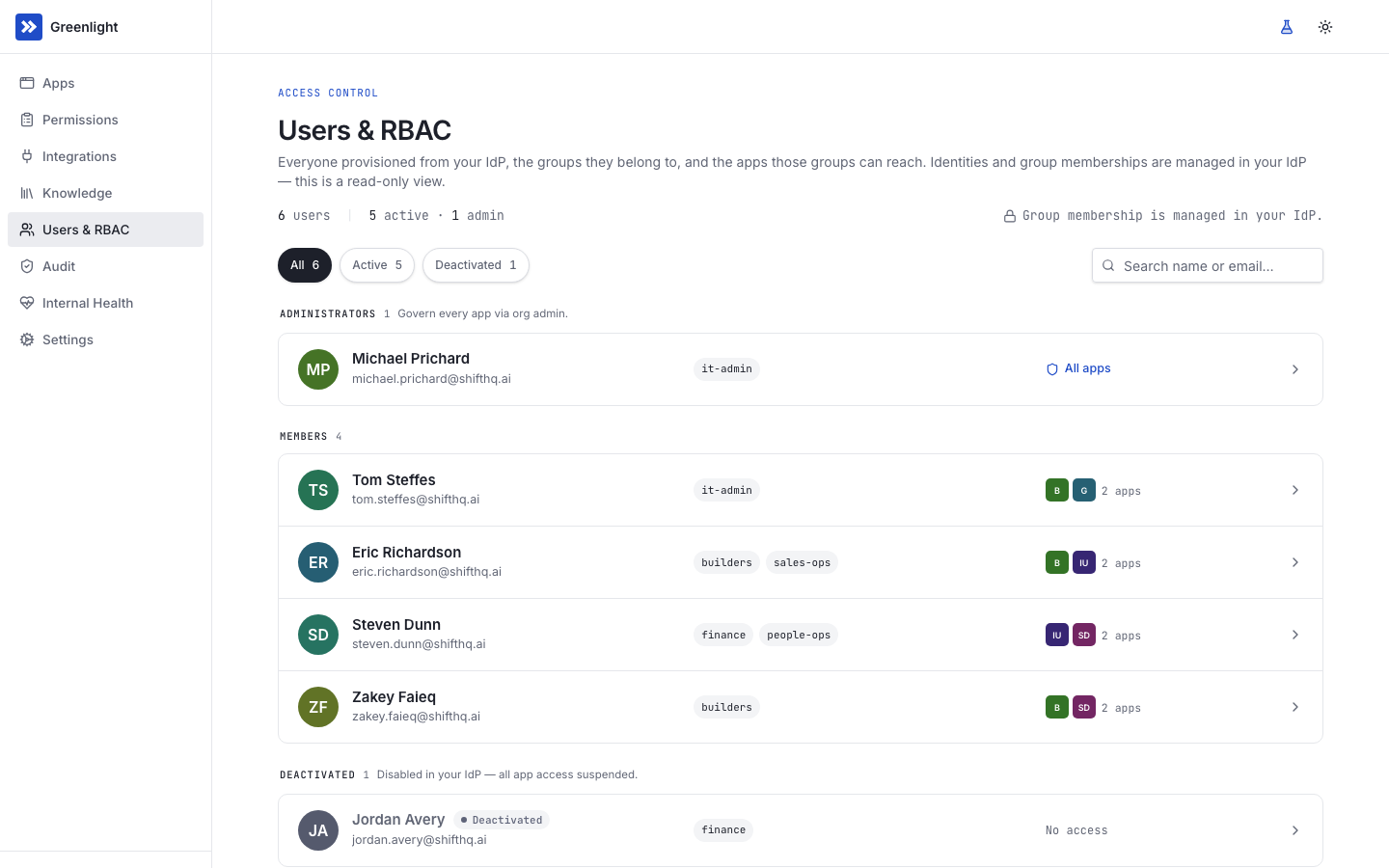
Section titled “Group-to-role mapping”Once SSO is working, the Users, groups, RBAC page in the dashboard captures the mapping from IdP groups to Greenlight roles. Group → role is the source of truth: each row maps one IdP group to one Greenlight role, and a user in groups mapped to several roles holds the strongest one. The user rows are optional and double as a sign-in restriction — with none, everyone who signs in through your IdP is a Builder; with one or more, only members of a mapped group can sign in at all. Role → user is a derived view showing who currently holds each role — useful for compliance reviews and for sanity-checking after a group rename.
Group-to-role mapping applies to Entra ID, Okta, and other OpenID Connect providers. The group identifier must match what your IdP’s group claim emits: Entra ID group object IDs; for Okta, the values of your authorization server’s groups claim (usually group names); for another OpenID Connect provider, exactly the values its groups claim carries (Authentik’s are group names). The form’s help text shows the format for your provider.
Google Workspace has no group claim, so it is not group-mapped: assign each person’s role directly on the Users page. A role you set there persists across sign-ins (it is not overwritten by any mapping).
Groups you manage in Greenlight
Section titled “Groups you manage in Greenlight”Group-to-role mapping is separate from the Groups section on the same page, which is where the organization’s named sets of people live. Every organization gets it, whatever its IdP. You create Greenlight groups there and member them yourself — useful for a cross-cutting set your directory does not model — and, where your IdP delivers groups, you register a directory group by pasting its identifier once and giving it a name. Registering is the only place an identifier is typed for app access — group-to-role mapping above takes one too, but nowhere an app owner works does. Everywhere a group is picked, it appears under the name you gave it. Registration makes no call to your directory; a registered group’s membership is read from what sign-ins have already told Greenlight, so it covers people who have signed in rather than the directory’s full answer.
Adding a mapping is two fields and a save: pick the IdP group, pick the role, save. The mapping is audited and takes effect for each user at their next sign-in — when mappings exist, the IdP is authoritative and each user’s role is recomputed from their groups every time they sign in, so a manual role edit lasts only until then. Removing a mapping is the same workflow — users who held the role only through that mapping lose it at their next sign-in; users who held it through other mappings retain it. The audit log captures the actor, the group, the role, and the time, so “how did user X get role Y” is answerable without reconstructing IdP history.
A typical mid-size rollout needs two rows:
| IdP group | Role | Reasoning |
|---|---|---|
| Greenlight Owners (1–3 people) | org_admin |
The install owners and long-term operators. |
| IT Operations | admin |
The team that handles integration requests, Knowledge curation, and incidents. |
Everyone else is a Builder automatically. Add user rows only to limit Greenlight to specific groups (for example, a staged rollout to one department). Keep it simple — additional mappings rarely add value and they complicate compliance reviews.
Showing group names instead of IDs
Section titled “Showing group names instead of IDs”Entra ID’s groups claim carries group object IDs, so by default every IdP group in the dashboard reads as a GUID — you need the Entra portal open beside Greenlight to tell finance-controllers from contractors-external. Greenlight can resolve those names for display. It is off by default and it is Entra only: Okta and Authentik are normally configured to emit group names already, and Google Workspace has no groups claim at all.
It is also public-cloud only. A sovereign Microsoft cloud (US Gov, China) serves Microsoft Graph from a different host, and the permission is requested as part of sign-in — so asking for the wrong one would break sign-in for everyone, not just name resolution. Greenlight refuses the setting on those tenants rather than let that happen.
Greenlight never holds a standing permission to read your directory. Names are read from each person’s own sign-in token, at sign-in, using the least-privileged delegated permission Microsoft Graph offers for the purpose (GroupMember.Read.All, which reads only the signed-in user’s own memberships).
Turn it on in two steps, in this order:
- In Entra ID, on the same app registration, grant tenant-wide admin consent for the delegated
GroupMember.Read.Allpermission. - In Greenlight, go to Settings → Identity and turn on Show group names instead of IDs.
Doing it the other way round is the one failure worth avoiding: with the setting on and consent not yet granted, Entra interrupts sign-in with a consent prompt for every user. Turning the setting back off restores the previous sign-in request immediately.
What to expect once it is on:
- Names arrive as people sign in. A group none of whose members has signed in since you turned it on still shows its ID, and a group renamed in Entra shows its new name after its next member signs in. The dashboard falls back to the ID rather than showing nothing.
- Display only. Access checks, role mapping, session tokens, and the
X-User-Groupsheader your apps receive all keep using the exact claim value, not the resolved name. Turning this on or off changes nothing about who can reach what. (Whatever the source, the values in that header are reduced to characters an HTTP header can carry: commas — the separator — and anything outside the Latin-1 range are replaced with a space, so a group named in a non-Latin script reaches your app stripped, or not at all. The same reduction applies to theX-User-Nameyour apps receive, so a person whose display name is written in a non-Latin script arrives with it stripped or empty. Their access is unaffected either way.) - The ID stays visible wherever you have to paste it — the role-mapping form still shows it beside the name and still takes IDs.
- Nothing is signed out. Unlike other identity changes, this one leaves every session alive.
Only an Org Owner can change the setting, and the change is audited.
Agent identity
Section titled “Agent identity”A coding agent that talks to Greenlight is authenticated as a specific user. The agent acquires this binding the same way a human does — through the IdP’s standard OAuth authorization flow. There is no separate “agent user” account; every agent session is bound to a real person.
Signing in normally happens in the person’s own browser: the CLI opens it and, when it already holds a Greenlight session, the binding completes with nothing for anyone to type. Completing that browser sign-in also signs the same browser into the Greenlight dashboard, so opening the dashboard afterwards does not ask for a second sign-in. Where no browser can be reached — an agent in the cloud, or a machine without one — the CLI falls back to a short code the person approves in any signed-in browser; the resulting session is bound to whoever approved it, so either route yields an identity traceable to one real person.
When the tool asking to sign in receives its result at a web address rather than on the person’s own machine, Greenlight stops after sign-in and shows a page naming that address. Nothing is issued until the person clicks Allow; Cancel is the default. A link or web page that starts a sign-in on someone’s behalf therefore cannot collect a token while they are already signed in.
This is what makes the audit trail useful. When the audit log records actor.type = agent, it also records actor_id — the person the agent was acting for. The agent cannot escalate beyond what that person can do. Failed attempts to complete that OAuth binding — expired or replayed codes, PKCE mismatches, a deactivated user — write auth.authorize.failed / auth.token_exchange.failed with a stable reason, the same way failed dashboard SSO attempts do.
The same principle covers the one place an agent needs browser access: verifying a deployed app visually. An agent’s browser tooling can’t complete an interactive IdP sign-in (MFA and conditional access are designed to prevent exactly that), so the agent requests a single-use preview URL for an app its user owns. Opening it exchanges the embedded token — once, within five minutes — for a short session confined to that one app’s hostname, acting as the same real user. Minting and exchange are both audited, the session honors every revocation path (group changes, session revocation, kill switch), and SSO enforcement at the ingress is never bypassed.
Workload identity
Section titled “Workload identity”Workload identity is the credential apps use when they call the data broker. It is minted by the cluster’s identity provider per pod, signed by the cloud’s own KMS, rotated automatically, and never persisted to the Greenlight control plane. When the broker authenticates an inbound request, it verifies the workload identity against the cluster identity provider, looks up which Greenlight app that workload belongs to, and uses that mapping to find the right upstream credentials. No part of this chain is a static service-account JSON the app would read at startup.
Verify SSO
Section titled “Verify SSO”The dashboard’s installation health page includes an “SSO round-trip” probe that signs into the IdP and back to Greenlight, then verifies the resulting session has the expected claims. Run it after every IdP-side change.