Data brokering
Concept
Every external system a Greenlight app reaches — Slack, GitHub, Salesforce, Snowflake, an internal REST API — is reached through an integration that IT registers once. The app authenticates as a workload identity; Greenlight authorizes the call against the grants for that app, supplies the right upstream credential, and writes an audit record attributed to the acting user when one is present.
The trust model fits in three checkpoints:
| Checkpoint | Guarantee |
|---|---|
| The workload | The app (or a developer’s local process) holds no upstream credential — only a Greenlight workload key that can’t reach any upstream directly. |
| The boundary | Greenlight resolves the approved credential only at request time and uses it at the proxy boundary — injecting it into an HTTP call or opening the connected-database session itself. Once saved, a secret is never displayed again; registration is write-only. |
| The upstream | Every call arrives with an attributable, IT-managed identity and is authorized against an explicit grant. Greenlight attempts one terminal audit event with the outcome; an audit-store failure is surfaced rather than silently claiming success. |
For a proxied integration, the app never holds the upstream credential at all — it can’t.
Why a broker
Section titled “Why a broker”Apps that hold their own credentials cause four ongoing problems for IT: credentials end up in source code, credentials drift between dev and prod, audit attribution is per-credential rather than per-user, and revocation means hunting down every app that has a copy.
A broker replaces all four with one operation. Apps authenticate as themselves using a workload identity that nothing outside the cluster can mint. Greenlight holds upstream credentials in the cloud-managed secret store and substitutes them at the edge of the request. Revoking an integration is a single dashboard action; every app that depends on it loses access on its next call.
How a call flows
Section titled “How a call flows”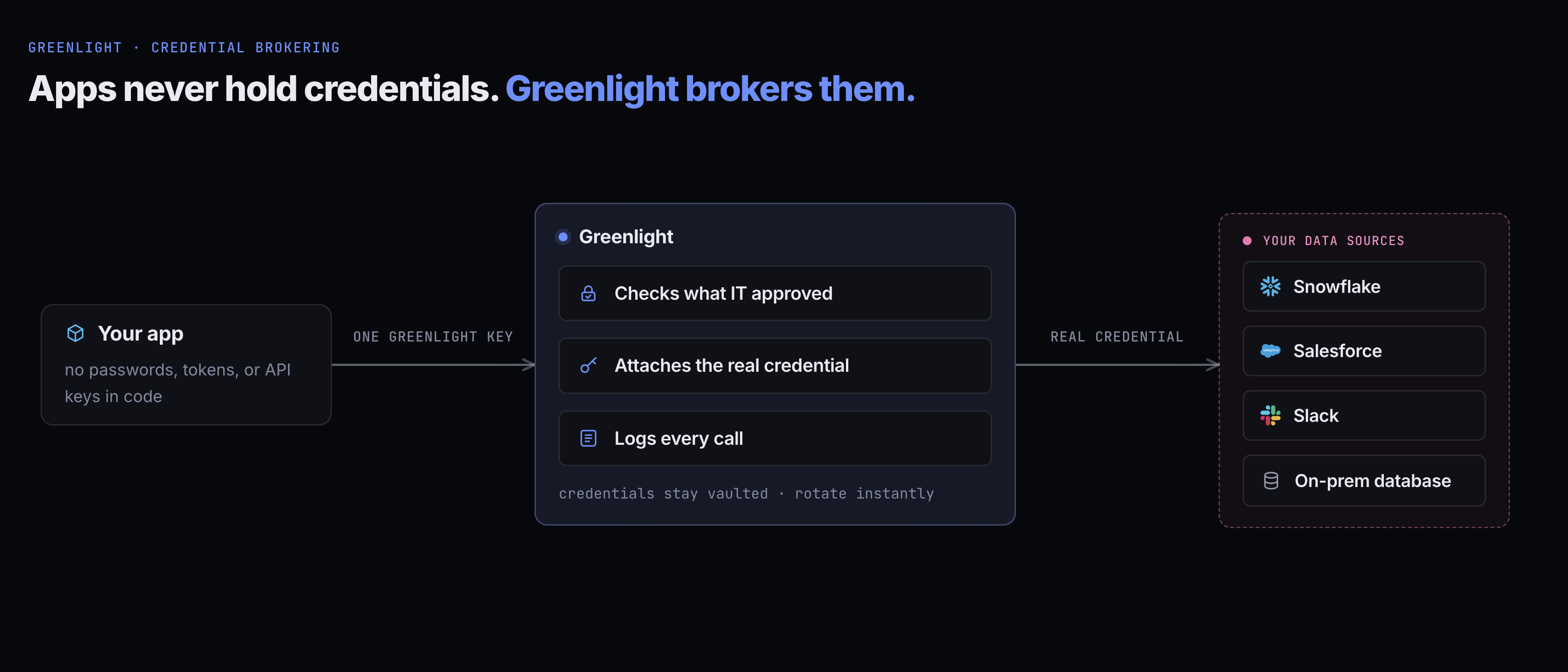
For a proxied integration:
- The app makes an HTTP call to the proxy URL it was handed in its environment (
GREENLIGHT_PROXY_URL), with the integration name in the path. - Greenlight validates the workload key and looks up the caller’s granted permission for that integration. Grants are held per principal — the app for a deployed pod, or the person themselves for a personal local run — so the lookup is always “does this caller hold a grant,” never a shared pool.
- Greenlight supplies the right upstream credential — substituting an IT-managed service credential, minting an OAuth client-credentials token, exchanging the current user’s identity for an upstream user token, or opening a connected-database session as the approved database identity.
- For HTTP, Greenlight forwards the request and proxies the response back. For a connected database, it runs one bounded query and returns a JSON result grid.
- Greenlight writes an audit record: the app, the acting user (when present), the integration, the outcome, and safe request metadata. Connected-database audit stores a statement fingerprint, never the SQL text. If the audit store is unavailable, Greenlight logs a safe replay payload and returns an explicit platform error.
The app sees a normal HTTP response. Nothing about the credential substitution is visible from inside the app’s code, and the upstream secret never leaves the cloud-managed secret store and broker boundary.
How an app reaches a credential: proxied vs injected
Section titled “How an app reaches a credential: proxied vs injected”How a granted credential reaches the app is its own choice, set by IT per integration:
- Proxied — the app holds only its Greenlight workload key and calls the proxy URL, placing that key where the upstream API or SDK would normally place its credential; Greenlight swaps in the real credential at the edge. The app never sees the upstream secret, every call is audited, and rotating the credential takes effect on the next request. This is the default for HTTP integrations, the only option when the upstream identity is the signed-in user, and how apps reach a connected database (below).
- Injected — at deploy time Greenlight places the credential value into the app’s environment under a name IT chooses, and the app calls the upstream directly. The trade-off is deliberate: the raw credential lives in the running app, there’s no per-call audit, and rotating it takes effect on the app’s next deploy rather than its next request. Because granting an injected credential discloses its raw value, the dashboard puts that warning in the approval confirmation rather than cluttering either grant inventory. The same confirmation is used whether IT acts from an integration’s expanded ledger or the cross-app Grants view. The revoke confirmation explains that revocation stops future delivery but cannot recover existing copies, surfaces pull history, and directs IT to rotate the upstream secret when needed.
The grant model is identical either way — the grant always decides which credential the caller gets; only the delivery differs.
Grants are per principal — apps and people. An app’s access is declared in its manifest and activates at merge; a person’s access is requested imperatively (their agent calls requestCredentialAccess) and reaches the same proxy under their own identity — for local scripts and analysis with no app at all. The predictability rule holds on both sides: what an app can reach never depends on who invoked it, and a person acts only under access they explicitly requested and IT (or policy) approved.
A credential can require groups. IT can mark a sensitive credential as usable only by members of chosen groups. A person is checked live on every call. An app keeps its grant only while everyone who can open it is inside those groups; if its owner opens it more widely, the grant is held with a stated reason until they narrow it again. The requirement never changes who can open the app, and never fails a deploy.
Connected databases
Section titled “Connected databases”A connected database is a database your organization already runs that apps use for bounded CRUD and queries without ever holding a connection string. Two targets are supported: Azure SQL and a Microsoft Fabric Warehouse (or Lakehouse SQL analytics endpoint). Because both speak TDS rather than HTTP, the proxy exposes a stateless CRUD/query API in front of them. The app sends SQL plus separately bound parameters to /query and gets one JSON result grid back:
POST $GREENLIGHT_PROXY_URL/<integration>/query{ "sql": "SELECT id, name FROM workers WHERE hired_at > @p1", "params": ["2024-01-01"] }→ { "columns": [...], "rows": [[...]], "row_count": 42, "truncated": false }For Azure SQL, Greenlight connects as its own managed identity (or a SQL login or service principal you register), so there is often no secret to paste at all. Fabric supports no SQL authentication, so a Fabric Warehouse is reached through an Entra service principal you register and grant, or as each signed-in person through user passthrough, where every query runs under that person’s own workspace role, GRANTs, and row-level security. With a shared identity a DBA grants that identity a database role, and that role is exactly what apps can do. db_datareader is the recommended starting role; writes work only with an explicitly granted write-capable role. Greenlight never tries to infer safety from the SQL text, so applications must bind untrusted values rather than interpolate them.
The gateway deliberately is not a remote SQL driver. A call returns at most one capped result grid, some native types require a bounded text cast, and truncated: true means the caller must page with SQL. Sessions are isolated and reset between requests, so there are no cross-request transactions, cursors, or streaming.
An app that needs those — interactive multi-statement transactions, server-side cursors, an ORM — can use its own driver instead, when IT registers the database with a service principal and chooses injected delivery. IT picks an env var prefix, and the app receives the connection fields and the client secret as separate variables (<PREFIX>_HOST, <PREFIX>_PORT, <PREFIX>_DATABASE, <PREFIX>_TENANT_ID, <PREFIX>_CLIENT_ID, <PREFIX>_CLIENT_SECRET), never as one connection string. The trade-offs are the ones every injected credential carries: the secret lives in the running app, rotating it takes a redeploy, and queries are not audited by Greenlight. The app also has to be able to reach the database over the network.
Every authorized call requires a canonical audit event — attributed to the acting user when one is present, otherwise to the app or named local developer. It stores a SHA-256 statement fingerprint and outcome metadata — never SQL text or parameter values. An audit-store failure is returned as a platform error rather than an unaudited success. Query errors identify the responsible boundary and separate “might succeed later” from “safe to replay”; see Errors & pagination.
A builder’s agent can explore a connected database before the app exists: the inspectIntegrationDb tool runs one query through the same engine, on the app’s grant or the builder’s own personal grant, and rolls back what an ordinary query changes. See the MCP tools reference.
Kinds of integration
Section titled “Kinds of integration”A proxied integration also differs by whose identity the upstream sees — the organization, or the signed-in user. IT picks this when registering the integration.
| Identity model | How access works | Used for |
|---|---|---|
| Service account | One IT-managed static credential — an API key, bearer, basic auth, query parameter, or one or more provider-specific headers. When a provider needs multiple headers, IT supplies any non-secret companion values during registration while Greenlight keeps the secret in the vault; the upstream sees a single service identity | Slack, GitHub, BigTime, Google Workspace, OpenAI, internal REST APIs |
| Client credentials | Greenlight mints a machine-to-machine OAuth token from an IT-registered client. The catalog also fixes how the token endpoint authenticates that client: form body (the default), HTTP Basic (Greenhouse), or a signed JWT assertion (NetSuite); the upstream sees an application identity | Greenhouse, NetSuite, and other machine APIs that issue application tokens but not per-user ones |
| User passthrough | The signed-in user’s own identity, so the upstream checks each call against that person’s own permissions; what the app reads as one person it shows only to that person. Usually via per-user OAuth: each person connects their own account once at the upstream’s sign-in, and Greenlight stores and refreshes a per-user token. Box has no connect step: one Box app IT authorizes for the whole enterprise mints a short-lived token for the signed-in person on each call | Microsoft Graph, Microsoft Fabric (the REST API and the API for GraphQL), Power BI semantic models, and Box from the catalog; any other OAuth upstream through a Custom registration |
A provider that supports more than one of these is registered as two integrations — for example a service-account salesforce for background syncs and a user passthrough salesforce-user for per-user views. Each app grants whichever it needs. A full breakdown lives in Integrations.
System integrations: the user directory
Section titled “System integrations: the user directory”Some data Greenlight brokers is data Greenlight itself owns. The first case is the org user directory: apps that need a people picker, an assignee dropdown, or to resolve a stored user id back to a name read the org roster through the same proxy, as a first-party integration named greenlight-directory. IT registers it from the catalog with no credential to paste, and apps must still request and be granted access, because the roster is personal data, never ambient. The API is read-only and deliberately minimal: each user exposes an id, email, display name, and active flag, and nothing else. Every read lands in the same per-app audit trail as external-API calls, so IT can always answer “which apps can see our people?”
What a grant means
Section titled “What a grant means”A credential IT registers becomes something a coding agent can use on someone’s behalf. Granting it to an app or a person lets their agent call the upstream with everything that key can do. Greenlight brokers and audits every proxied call, but it does not narrow the key: the credential’s own permissions in the upstream are the boundary, and the scope IT records on it is a description, not a restriction. That is why each key should be created least-privilege, on a dedicated upstream account where possible.
The dashboard says this at the two moments it matters. Every registration explains it, and until the organization has accepted the data-access terms, registration also asks the administrator to accept them, once for the organization. Approving a grant restates it for that specific app or person, credential, and system.
Registering from the catalog
Section titled “Registering from the catalog”IT doesn’t build most integrations from scratch. The dashboard ships a catalog — a curated, logo’d list of known providers (GitHub, Slack, OpenAI, Salesforce, Snowflake, and more). Picking one prefills the display name, the base URL, the identity model, and where the credential goes on the wire, and links to the upstream’s own instructions for obtaining a key. It also seeds the integration’s first knowledge entries — a connection overview, idiomatic queries, and common errors — so an app’s agent starts with useful context instead of a blank page.
For anything not in the catalog, the Custom path registers any HTTP API by hand: a name, a base URL, the identity model, and one or more credentials. Custom integrations start with no seeded knowledge; IT or an app owner adds the first entries.
Workload identity
Section titled “Workload identity”A Greenlight app does not carry an upstream password, token, or service-account file. It carries one thing: a workload key, handed to it as an environment variable at deploy time. The key is opaque and app-scoped — it identifies which app is calling, nothing more. It is not an upstream credential and does not represent a human. For service-account integrations, app code sends this key in the same header, basic-auth component, query parameter, or SDK API-key field the upstream normally uses; Greenlight replaces it before the request leaves the proxy.
When Greenlight receives a proxied call, it resolves that key to exactly one app, confirms the app has a granted permission for the integration in the path, and only then supplies the upstream credential. The key can be revoked from the dashboard, and calls with it fail within a minute. A developer’s short-lived local token fails on its very next call. The app’s own code never needs to know any of this is happening.
For user passthrough integrations the workload key isn’t enough on its own — the call also carries a short-lived token proving which signed-in user it’s on behalf of, so the upstream acts as that user. A call without that token, with an expired one, or with one whose Greenlight session has since ended is refused, and so is a request an administrator makes as another person: the upstream only ever sees the person who is actually there. Nothing the app itself sends can choose the user.
What apps see in code
Section titled “What apps see in code”The proxy URL, integration name, and workload key are the only Greenlight-specific things the app needs. For a bearer-shaped integration:
const res = await fetch( `${process.env.GREENLIGHT_PROXY_URL}/slack/api/chat.postMessage`, { method: 'POST', headers: { Authorization: `Bearer ${process.env.GREENLIGHT_DATA_KEY}`, 'Content-Type': 'application/json' }, body: JSON.stringify({ channel: '#general', text: 'Hello' }), });For an API-key-header integration, the same pattern becomes X-Api-Key: process.env.GREENLIGHT_DATA_KEY; for a query-param integration, it becomes ?apikey=${process.env.GREENLIGHT_DATA_KEY}. The broker handles the difference. Always read GREENLIGHT_PROXY_URL from the environment rather than hardcoding it — that’s the contract that lets Greenlight change the URL without touching app code.
Local development
Section titled “Local development”When an agent runs the app locally the same brokering applies, with no credential landing on the laptop — see Local development.