App deployment & isolation
Concept
When you register a new app in Greenlight, the platform creates a dedicated place for it to run — separate from every other app in your organization. If the app needs a database or object storage, the coding agent declares them in the app’s greenlight.yml and Greenlight provisions them when the pull request merges. Postgres is reached through DATABASE_URL; blob storage is reached through the data broker (GREENLIGHT_PROXY_URL + GREENLIGHT_DATA_KEY).
The app brings the code; Greenlight brings isolation boundaries, the image registry, network policy, workload identity, and lifecycle management.
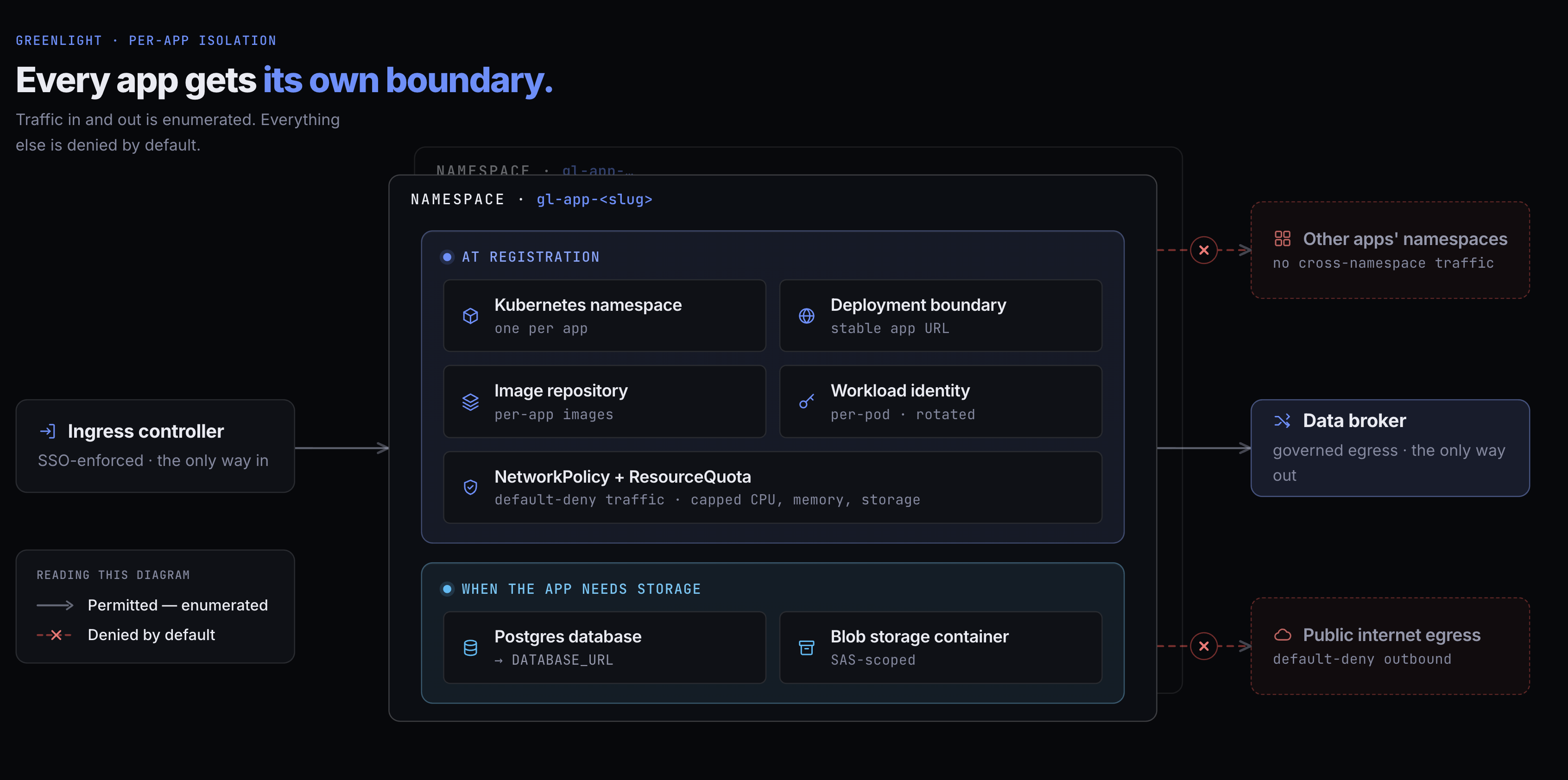
At registration
Section titled “At registration”Every registered app gets these resources, provisioned in your cloud environment. The app never holds cloud admin credentials.
| Resource | What it gives the app | What it isolates |
|---|---|---|
Kubernetes namespace (gl-app-<slug>) |
The boundary the app’s pods run in. | No cross-namespace traffic; no cluster-level RBAC. |
| Deployment boundary | A governed place to build, deploy, and reach the app at its org subdomain after the first successful deploy. | Each app’s runtime and URL are separate from other apps. |
| Image repository | Created when the app is registered; the pipeline pushes the built container image here on every merge to the default branch. | One repository per app; pull credentials are managed by the platform. |
| NetworkPolicy | Ingress only, from the SSO-enforcing controller plus narrowly selected Greenlight verification and imagery services. Egress is unrestricted today. | A compromised app cannot be reached by other apps or the control plane. Outbound is not yet a boundary — see Network isolation. |
| ResourceQuota | A namespace-level CPU, memory, and pod-count ceiling. | One app’s load can’t starve others. |
| Workload identity | The credential the app uses to authenticate to the data broker. | Per-pod, signed by the cluster, rotated automatically. Never stored in app source code. |
When the app needs storage
Section titled “When the app needs storage”If the app needs durable data, the coding agent declares a database, file storage, or both in the manifest’s resources: block:
| Resource | What it gives the app | What it isolates |
|---|---|---|
| Postgres database | Durable storage, injected as DATABASE_URL. |
A scoped database user; the app cannot see other apps’ databases. Private network path only. |
| Object storage container | Blob storage for uploads, exports, and backups, reached through the data broker. | Objects stay in this app’s container; the app cannot list or read other apps’ storage. |
Greenlight creates the resources and the app reaches blob storage through the same data-broker pair as integrations (GREENLIGHT_PROXY_URL + GREENLIGHT_DATA_KEY) via a small module copied from the storage Skill. Local development uses the same path; see App environment variables. Later deploys reuse the same storage.
greenlight.yml in the app repo is where that declaration lives. The agent edits its resources: block and opens a pull request; on merge the reconciler provisions what it finds. No MCP tool provisions infrastructure — the declared and live state is read back through getApp.
Lifecycle states
Section titled “Lifecycle states”Dedicated resources move with the app through the governed deployment lifecycle.
| Status | Namespace | Postgres | Object storage | Image repo |
|---|---|---|---|---|
| Registered | Created | When declared | When declared | Created on first build |
| Building / Deploying | Preparing rollout | Preparing | Preparing | Building image |
| Active / Degraded | Running | Active | Active | Active |
| Failed | Preserved for retry | Preserved | Preserved | Preserved |
| Paused | Scaled to zero | Preserved, idle | Preserved | Preserved |
| Deleted | Deleted | Dropped | Deleted | Deleted |
Restore from Paused brings the app back with its data intact. Delete is the permanent retirement path: runtime resources are torn down and the source repo is archived (not deleted) to preserve history, unless it was already deleted or moved out of Greenlight’s reach. A configurable retention window that holds the database for a recovery period before dropping it is planned but not yet available.
What network policy enforces
Section titled “What network policy enforces”The NetworkPolicy attached to every app namespace governs inbound traffic only. It admits these flows and blocks the rest:
- Ingress is permitted only from the cluster’s ingress controller, which terminates TLS and enforces SSO before traffic reaches an app pod.
- Internal verification and imagery are admitted only from the Greenlight control-plane server and renderer pod identities. This lets the agent verify a deployed response and lets Greenlight capture app imagery without opening app-to-app traffic.
Outbound traffic carries no rules at all. An app reaches the data broker and its own Postgres because nothing stops it — not because a rule admits it.
Pod-to-pod traffic across namespaces is blocked at the policy layer. Outbound restriction is not built yet — there is no setting that changes this today — so public-internet egress and the cloud metadata service are reachable from an app pod. Network isolation sets out what holds today and what the planned lockdown will establish. The broker remains the only path that carries an upstream credential, so it is the only way an app reaches a SaaS API with access.
Resource quota
Section titled “Resource quota”Each namespace gets a fixed CPU, memory, and pod-count ceiling, so one app’s load can’t starve the others. Separately, the compute a single workload may request is capped by a check IT configures under Settings → Policies. What an app declares there is reserved for as long as it’s deployed, spent or not, so a second check warns (without blocking) when a declaration runs well ahead of the sizing guidance.
Raising a namespace’s own ceiling for an app that genuinely needs more is Coming soon — it’s on our roadmap as a request the app’s owner files and IT approves. Today every app gets the same ceiling.