Source control & the policy check
Concept
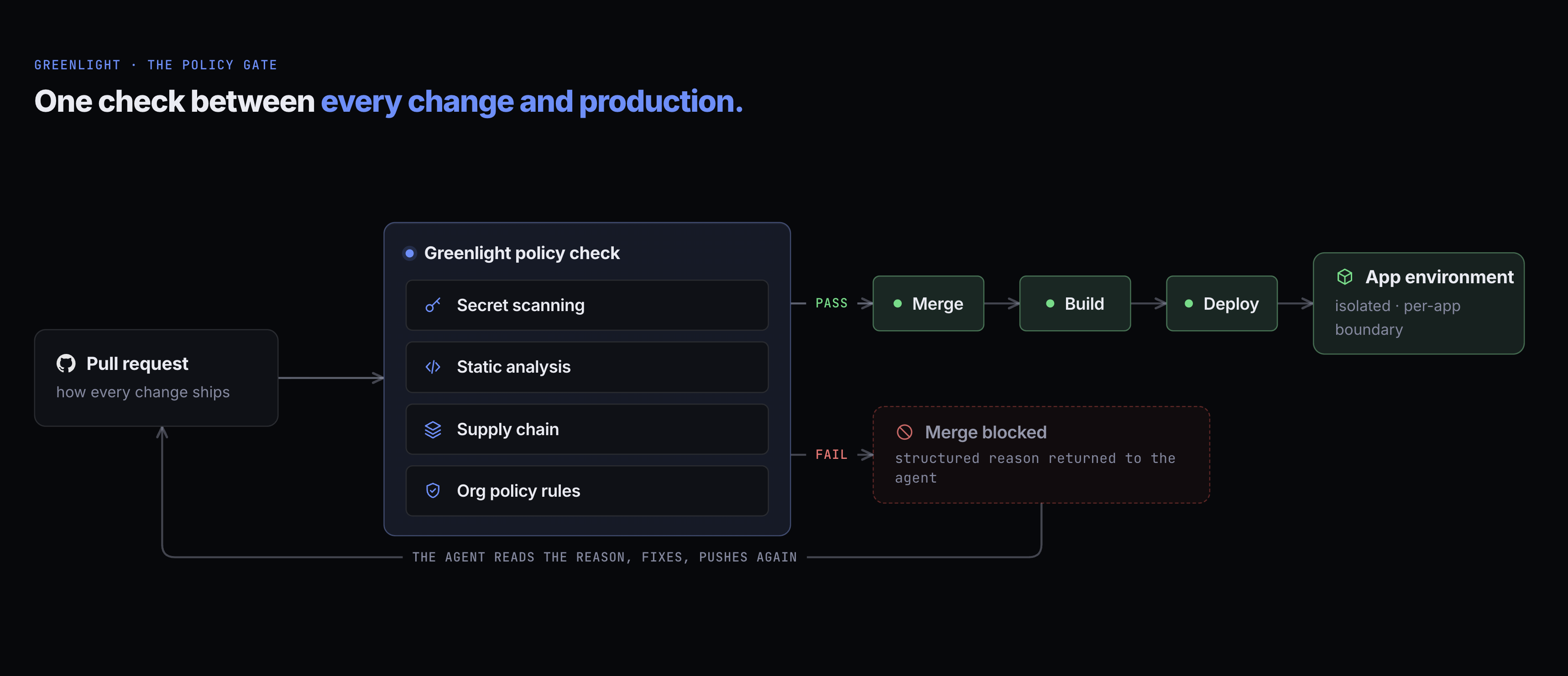
Greenlight enforces a single delivery path: pull request, policy check, merge, deploy. There are no out-of-band writes and no shortcuts. The same path applies to the coding agent, the citizen developer, and IT.
What the check runs
Section titled “What the check runs”Greenlight’s policy check is a single status that posts on every pull request and aggregates three kinds of analysis.
| Check | What it catches |
|---|---|
| Secret scanning | API keys, tokens, and private keys committed in the diff. |
| Supply chain | Dependency CVEs — Critical findings deny, High ones report as warnings. Whether a denial blocks the merge is your organization’s setting; this check starts in warn. |
| Org policy bundle | Rules evaluated by OPA against your organization’s state — approved base images, resource limits, no committed .env files, and validation of the app’s greenlight.yml against the integrations and resources you’ve actually registered. |
Greenlight does not run its own general-purpose static analysis. Commodity SAST is better served by the scanner your organization already runs, and Greenlight is designed to sit alongside it rather than replace it.
The policy bundle is org-scoped, and your tuning of it lives as structured rows — changing whether a check is on, and whether it blocks or warns, takes effect on the next run with no platform redeploy. You don’t add rules: the checks are the ones above, plus any check your own scanner posts that you ask Greenlight to require. See Manage policies.
The agent can read the active policy set at any time via the getPolicies MCP tool — so it can fix violations on the first try instead of guessing.
What the PR shows
Section titled “What the PR shows”A pull request that passes the check shows a single green status from Greenlight. Green means the checks passed; a branch that has fallen behind its base still has to be updated before it can merge. A pull request that fails shows the same status with a structured reason that the agent reads and acts on:
✗ greenlight/policy-check          Failed (2/4 checks)  • secret-scanning: API key found in src/integrations/snowflake.ts  • org-policy/approved-base-images: base image not on the allow-list
Status: merge blocked
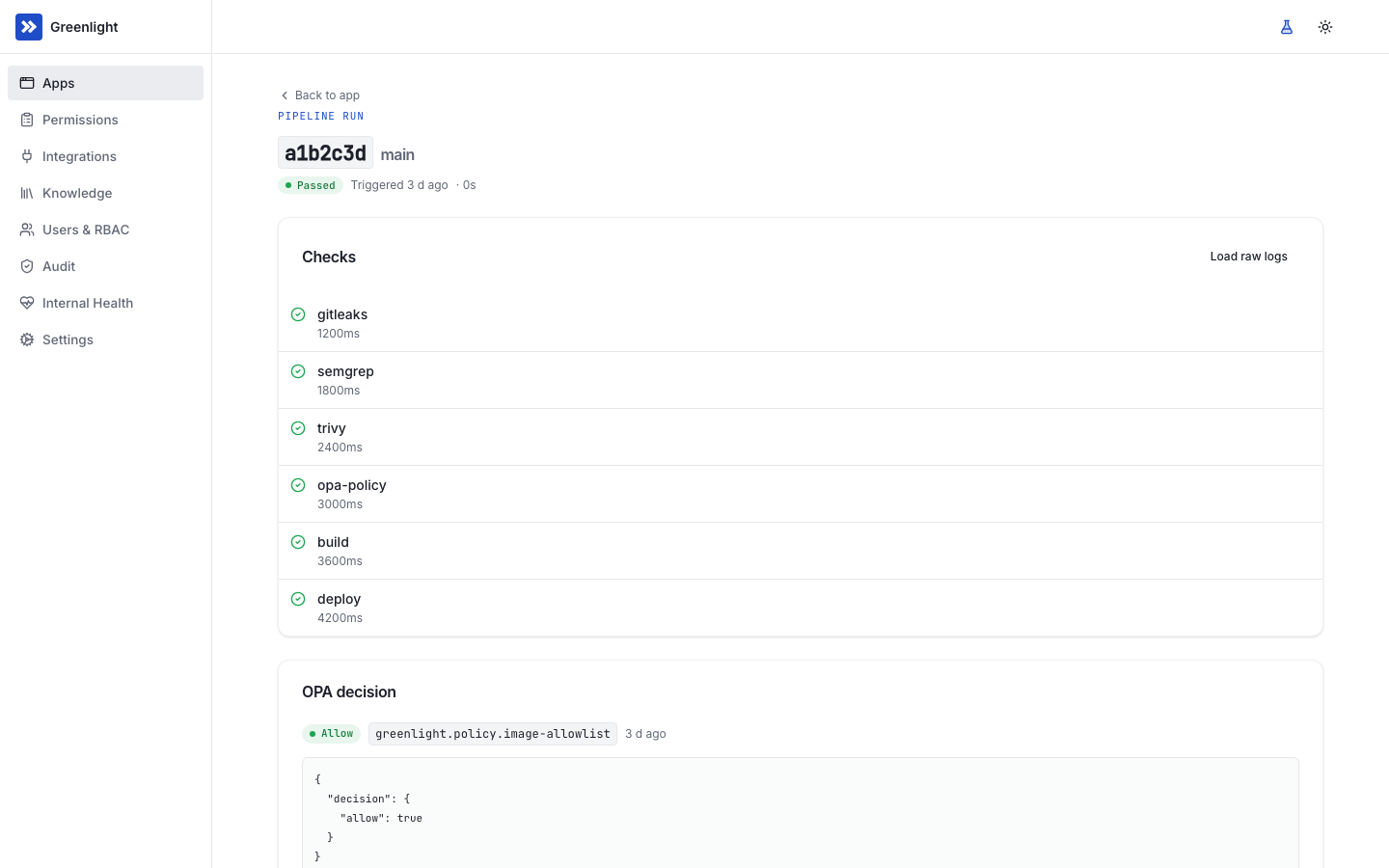
The dashboard’s Deployments tab on each app detail page shows every run with its per-check verdict, the OPA decision JSON, and a link to the raw logs.
What happens on failure
Section titled “What happens on failure”- The status goes red. The PR comment includes the structured failure reason.
- The agent reads the failure. Either from the PR comment or by calling
getPoliciesto compare its diff against the active rules. - The agent fixes and pushes. Same branch, same pull request. The check re-runs automatically.
- The status goes green. The checks passed. If the branch is behind its base, update it and wait for the new head to pass before merging. Merging triggers deployment.
When the pipeline never runs
Section titled “When the pipeline never runs”The check runs on GitHub Actions, in your GitHub organization. If GitHub never starts the workflow, never finishes it, or refuses to run its jobs, Greenlight does not leave the pull request waiting. It fails the run and says why on its run_verification check:
| Code | What happened | Who acts |
|---|---|---|
pipeline_actions_blocked |
GitHub would not run the jobs because of the organization’s Actions billing — a failed payment, a spending limit, or a quota. | An owner of the GitHub organization, in GitHub’s billing settings. Every app is blocked until then; nothing in the app needs to change. |
pipeline_not_started |
GitHub started no workflow run within 10 minutes. | IT: check that GitHub Actions is enabled for the repository and the organization. |
pipeline_timed_out |
The workflow had not finished after 60 minutes. | Open the run on GitHub, then push again. |
pipeline_unreadable |
Greenlight could not read the run from GitHub for 60 minutes. | IT: check the GitHub App is still installed and can read the repository. |
A billing block affects the whole organization, so Greenlight sends your administrators one alert and shows them a banner on every page, rather than one failure per app. It clears by itself once the next run reaches Greenlight — re-run a blocked workflow or push again once billing is fixed.
The Greenlight GitHub App
Section titled “The Greenlight GitHub App”Greenlight talks to your source-control system through the Greenlight GitHub App, which scopes access to a specific GitHub organization and specific repositories. GitHub is the supported provider today. Azure DevOps, Bitbucket, and GitLab are planned; each will connect through that provider’s own mechanism rather than a GitHub-style App, with the same policy gate and the same short-lived, Greenlight-issued repository access.
The App is responsible for:
- Creating repositories when an agent calls
registerApp. - Opening pull requests on behalf of agents (the PR’s author is the bound user; the App is the source).
- Posting the single Greenlight Review and Policy Check status on every PR, after Greenlight verifies the scanner evidence and runs the policy engine.
- Reading metadata Greenlight needs to display the app’s status and history in the dashboard.
- Reading the check results other apps post on a commit — read-only, and what lets you require your own scanners as part of the check.
The App does not have admin permissions on your GitHub organization, push to main, or modify branch-protection rules outside the repositories Greenlight created. It can write only its own check status; reading other apps’ checks does not let it change them.
Upgrades never change what you already granted
Section titled “Upgrades never change what you already granted”The Greenlight App is created in your GitHub organization, from a manifest, at install time — so the permissions it holds are the ones you approved when you created it. Upgrading Greenlight does not add permissions to it, cannot re-scope it, and never raises an approval prompt on an installation that is already running.
If a later Greenlight capability needs access your App wasn’t created with, that capability simply stays unavailable until you choose to grant it. Greenlight tells you what is missing at the point you try to use the feature, rather than asking up front for something you may never need.
Installing it
Section titled “Installing it”- Start from the dashboard. Navigate to Admin → Source control and click Install GitHub App. You’ll be redirected to GitHub’s App install flow.
- Pick the target organization. Install the App on the GitHub organization that will host your Greenlight-managed repositories.
- Choose repository scope. Greenlight needs to create repositories, so install with “All repositories” or with the + Create new repositories permission. Existing-repo adoption is a separate post-install workflow.
- Confirm permissions. GitHub lists the permissions the App asks for — they map to the responsibilities above; no admin or org-owner permissions are requested.
- Verify in the dashboard. Back in Greenlight, the Source control page should show the App as installed with a green checkmark.
Reinstalling, replacing, or moving the App
Section titled “Reinstalling, replacing, or moving the App”The install isn’t a one-way door. Settings → Source control supports three lifecycle operations, all restricted to org admins and all audit-logged:
- Reinstall on the same org. If the App was uninstalled, installing it again reconnects automatically — Greenlight detects the new installation and verifies it can still reach every managed repository. Any repos the new install can’t see (for example, a “selected repositories” install missing entries) are flagged for you rather than silently skipped, and a Verify access action lets you re-check on demand.
- Re-create the App. If the App was deleted on GitHub, its key was compromised, or your Greenlight URL changed, an admin action re-runs the App creation flow and rotates Greenlight’s stored App credentials to the new App. Webhooks from the new App verify immediately — no restart. Greenlight never deletes the old App on GitHub; once the replacement is working, remove the old one yourself.
- Migrate to a different GitHub org. Install the existing App on the target org (Greenlight records it as a pending target without disturbing the current connection), transfer the managed app and plugin-marketplace repositories in GitHub, then run the migration from settings. A preview shows exactly which repositories will be re-pointed before anything changes, and the migration only completes once every repo is reachable under the new org — then all coordinates move in one step and app-repository branch protection is re-verified. Marketplace visibility and automatic updates carry over at the new coordinates, and deployed apps keep serving throughout.
Branch protection
Section titled “Branch protection”Greenlight creates new repositories with branch-protection rules pre-configured: main requires the single Greenlight Review and Policy Check status to be green before merge, and force-push to main is disabled. There are no human reviewers in the loop — the scanners and policy engine behind that one status are the review. The rules are visible and editable in GitHub’s branch-protection UI; Greenlight does not silently reset them.
The default path is for Greenlight to create new repositories for every app. Bringing an existing repository under Greenlight governance — repo adoption — is a more deliberate workflow, since the existing history needs a one-time policy scan and existing branch protection has to be reconciled; ask in your install for the adoption playbook.
What’s in a Greenlight-managed repo
Section titled “What’s in a Greenlight-managed repo”A Greenlight-managed repo has the same shape as any other repo, plus:
- A
greenlight.ymlat the root withapp_id, requireddocsmetadata, and the declaredworkloads/resources/grants/envblocks. Env-var values are set via MCP; everything else is declared in the file. - A pre-commit hook (optional) that runs the same scanners the policy check runs, so the agent gets fast feedback.
- A GitHub Actions workflow Greenlight installs and updates, which runs the scanners and uploads their evidence. When a merge lands content Greenlight scanned within the last day — the usual case, since a branch has to be up to date with
mainbefore it can merge — the merge run reuses those verified findings instead of scanning identical files twice, and pushing again to a branch cancels the run the previous push started. The merge still gets its own verdict from Greenlight, backed by evidence Greenlight verified for exactly those bytes; anything the merge actually changed is scanned fresh. Greenlight verifies that evidence, runs the policy engine, and posts the resulting status — the workflow itself doesn’t decide the outcome. Onmainthe workflow also pushes the app’s image: it exchanges its GitHub OIDC token for your install’s registry push identity, a cloud identity that can push images to your registry and do nothing else, and that identity trusts onlygl-app-*repositories onmainin your GitHub organization. No registry credential is stored in the repo. Greenlight keeps this one file current as the platform changes (briefly adjusting branch protection for that write, then restoring it); the file says so in its own header, and a local edit to it is reverted. If an app’s deploys were failing and the update may be the fix, Greenlight also starts a fresh pipeline run itself by pushing a small no-change commit — so you may see a “run the Greenlight pipeline (recovery)” commit and run that no person made. Nothing else — no person, no agent — can push to the protected default branch.
The developer and the agent both treat the repo as a normal Git repo. Policy enforcement happens through PR statuses, not hidden tooling.
On a private install
Section titled “On a private install”A private install has no public address, so neither GitHub’s webhooks nor GitHub-hosted runners can reach it. The pipeline still runs on GitHub Actions and posts the same Greenlight Review and Policy Check status. What changes is that Greenlight does the calling:
- Finding and gating runs. When an agent opens a pull request, merges, or asks for a run, Greenlight looks the run up through GitHub’s API and checks on it every fifteen seconds to a minute until it finishes. The workflow uploads the scanner report as an artifact, and Greenlight reads it from there, so the verdict comes from the same evidence as on a public install. A run that never starts within ten minutes, or isn’t finished within an hour, fails with a message saying what to fix.
- Reusing scans. After Greenlight verifies a tree, it records that in a variable on the repository. The merge run reads the variable and reuses those findings instead of asking Greenlight.
- Learning the App installation. The App’s webhook is inactive. While the setup wizard waits on its GitHub step, Greenlight asks GitHub for the App’s installations and records the one you install. After setup it doesn’t check again, so an uninstall, reinstall, or move to another GitHub org isn’t picked up automatically on a private install.